Network Configuration
This section describes the networking options in the OVOC Server Manager.
| ➢ | To run the network configuration: |
| ■ | From the OVOC Server Manager root menu, choose Network Configuration, and then press Enter. |
Network Configuration
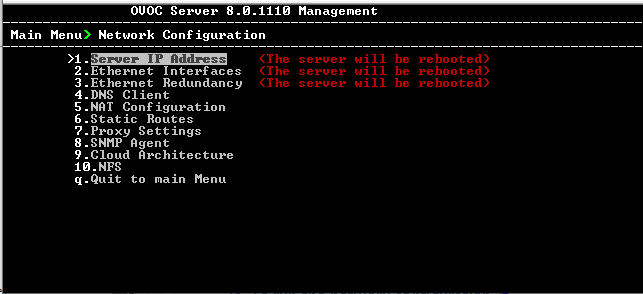
This menu includes the following options:
| ■ | Server IP Address (the server will be rebooted) ( Server IP Address) |
| ■ | Ethernet Interfaces (the server will be rebooted) (Ethernet Interfaces) |
| ■ | Ethernet Redundancy (the server will be rebooted) (Ethernet Redundancy) |
| ■ | DNS Client (DNS Client) |
| ■ | NAT (Configure OVOC Server with NAT IP Address per Interface ) |
| ■ | Static Routes (Static Routes) |
| ■ | OVOC Proxy Settings (Proxy Settings) |
| ■ | SNMP Agent (SNMP Agent) |
| ■ | Cloud Architecture (Configure OVOC Cloud Architecture Mode (WebSocket Tunnel)) |
| ■ | NFS ( NFS) |
| ● | The following options are not applicable in Cloud deployments: |
| ✔ | Server IP Address |
| ✔ | Ethernet interfaces |
| ✔ | Ethernet redundancy |
| ● | The following options support IPv6: |
| ✔ | Ethernet Redundancy |
| ✔ | DNS Client |
| ✔ | Static Routes |